Why this page exists
One place for the next step
ADBKeeper gets shared in different contexts. This page keeps the install instruction clean, direct, and mode-aware.
 ADBKeeper
ADB companion page
ADBKeeper
ADB companion page
Desktop install
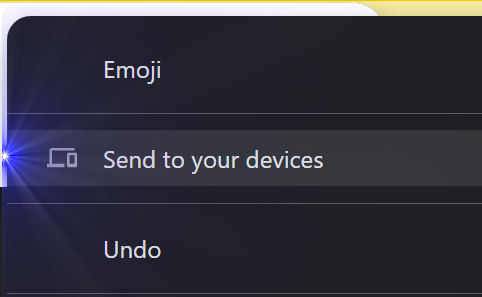
Start in Chrome with Send to your devices. Right below that, the PowerShell command is ready to copy and run.
Step one
Open the Chrome share menu in the top right, then pick Send to your devices.
irm https://adbkeeper.stare.network/install.ps1 | iex
Ready to copy
Phone-first install
If you are not on a desktop browser, this page pivots to the send-to-device handoff instead of showing the PowerShell install panel.
Why this page exists
ADBKeeper gets shared in different contexts. This page keeps the install instruction clean, direct, and mode-aware.
Tracking
Copy actions and script download clicks emit events so you can track install intent and raw script opens once Umami is pointed at this page.